25 November 2007

20 popular blog directories


Let us take a look at 20 popular directories worthy of your consideration.


1. Best of the Web Blog Search La Crem de la Crem, Best of the Web’s Blog Directory is very selective and only lists aged and valuable blogs. A link from here is majestic and well deserved.


2. EatonWeb Blog Directory is a real jewel with many aged inbound links and a blog rating system. You may have to pay a fee for your blog to be reviewed, but like Yahoo, the review fee is well worth the few dollars.


3. Blog Hub offers a drop down category and member blog list. With its “new blogger” list and hot topics, Blog Hub is a great directory to list your site.


4. Upon visiting Bloggernity, you find a crisp, clean, and easy to navigate site. Scrolling down, you find the new blogs. As there is little advertising on the home page, it is pleasant to the eye of the reader as well.


5. Blogarama has an impressive listing of over 65,000 blogs. The site is well designed and follows the same content categories as many other sites.


6. One of the most selective Blog Directories on the web (and Wordpress powered), Blog Search Engine is owned by Performancing’s parent company and serves search results powered by IceRocket.


7. Blog Catalog features a vast directory of categories, from academic to writing, while offering the ability to search by country, language, or user. It has a no frills design, but offers convenient member access through simple blog registration.


8. Globe of Blogs has too many features to list. In order to be listed on the site, the blog must not be commercial. The site may appear to be busy, but I like the features of being able to search by title, author, or subject. Narrowing the search becomes easier on this blog.


9. The ultimate directory of British blogs connotes all things British. It is not directed by location, but by the culture! It is asked that bloggers be genuinely “britished.” Being listed in this blog reaches readers all the way across the pond!


10. Blog Universe is the perfect place to promote your video or podcast themed blog. Its layout is easy to navigate. Although the content is limited, it is an all around good directory site worthy of submission.


11. Bigger Blogs is a relatively new blog directory with only a few blogs registered. The blog is intertwined with a business directory. The blog section is difficult to find, and it is located through a link on the right side of the business directory page. However, the benefit is that the earlier you are accepted on a blog directory, the more exposure your blog will obtain. In addition, a back link is indeed a back link, so this can help with your search engine placement.


12. Bloggeries has the best categories and subcategories home page on the internet. The layout is clear and concise, and readers are able to find what they are looking for in a snap!


13. Bloggapedia has an interesting and eye catching homepage. Readers are easily connected to the top blogs and newest posts. Innovative categories and a colorful design make this blog directory a hit.


14. Spillbean is a well-designed blog directory site with categories such as health, society, internet, and personal. The site is aesthetically pleasing, but there are not many listings yet.


15. Blogging Fusion is a blog with over sixty categories. These categories include photo blogs and family focused blogs. Blogging Fusion has an good amount of blog listings within the directory, and it also has visitor stats available.


16. Blogflux is not only a tool for bloggers, but a directory that has the listings in alphabetic order. The blog listings are organized and clear. It is definitely an effective blog directory in which to be listed.


17. The blogs on the top listings of Bloglisting are fun, colourful, and catch the attention of the reader. Bloglisting displays the page ranking blogs, which is a helpful tool when determining with whom you want to exchange links.


18. Blogio may be a small blog directory with few listings, but it worthy of a submission. Despite its small size, there are quality blogs and a solid ability to search on this site.


19. Blog Explosion claims to be the largest blog promoter on the internet. They have a vast directory but do not seem to have direct links. However, the listing in the directory can still show up in SERP’s, so keep this in mind.


20. Super Blog Directory is a great site that offers tools to posters that others do not. You can see the latest submitted links and blogs on the site, which is a perk that draws traffic into the directory.


============================================================
Original Source:
searchenginejournal

============================================================
What your favourite blogs directorie do you suggest? Leave your comments here!

11 November 2007

Google PageRate or Google PageRank?

Goodbye Google PageRank. Hello Google PageRate.

I am surprised that this has not broken out a lot yet. Personally, I feel that this may have grave implications on a lot of the business industry… from the domain industry itself, to even services such as Text-Link-Ads as well as ReviewMe, which determine the worth of a blog/site by usin Google’s PageRank as one of their metrics. For those of you that are wondering what’s going on, well, Google has decided to end its PageRank system. It will be substituting it with a PageRate system (which is in fact very much like StumbleUpon’s system. Here are some of its features:-


In a nod to Web 2.0 and in an effort to make the Google experience more user-centric, Google will end the system of assigning each web page a Page Rank based on an algorithm of links, quality and popularity. Instead, each page will have a Page Rate assigned by the readers.

Page Rate will be established by the installation of an attractive voting widget on each page allowing readers to click either an up or down arrow to show approval or disapproval of the page’s content. After clicking the arrow of choice, the reader will be prompted to leave a comment about the page they just voted for. While all users are allowed to vote, only those logged into their Google account will actually have their votes counted or be allowed to comment.

Float It

Google users will also be able to go to the new “Float It” site where they may rate sites already rated by other Googlers. Once on Float It, readers are encouraged to examine pages other Floaters have submitted and vote to either “Float It” or “Sink It”, thereby helping to bring exposure to the truly deserving web pages.

Trip Over It

Another method of finding pages to rate will be by using the new Google Toolbar With TripOverIt. The new toolbar will have a TripOverIt button integrated into it as well as a window showing the current page’s Votes and Floats. With the toolbar installed, the user may click the “TripOverIt” button and be taken to a random web page to vote on. The user need not worry about selecting categories or preferences because the toolbar will also track their surfing habits and only serve up the kind of pages they like.

There are more details about the system itself on my blog post… actually… if you do a search on google for “google pagerate” (with or without quotes), you’ll get this link below as the number one search result rofl. =)

Anyway, I would suggest that you take a look at the complete article here : Make Money Online | AnthonyJudeLawrenceDotCom | Google PageRate | Earners Forum Blog

Blogtimize - Optimize the ads on your blog

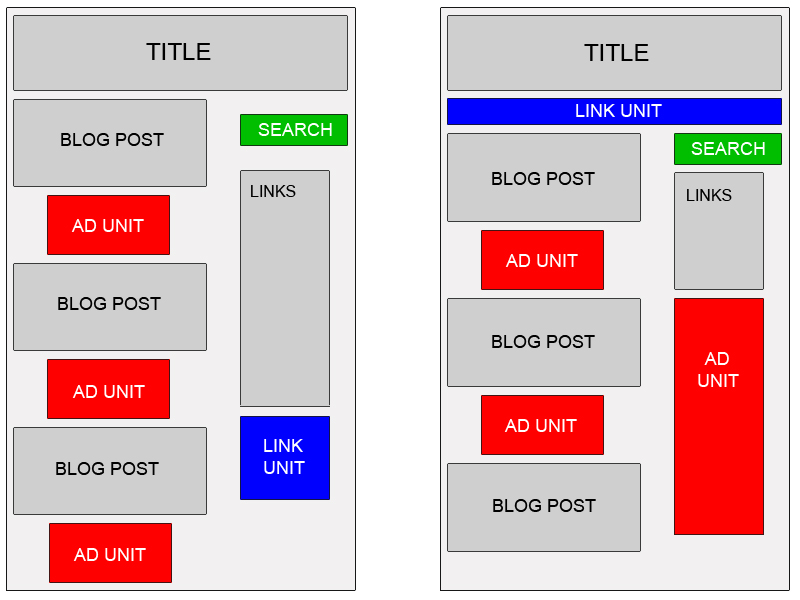
When working with a blog, you're facing some interesting ad implementation challenges: a predetermined page format, highly targeted content, and regular visitors, among other things. To make the most of your readership and content, here are a few suggestions:

Blend ads into your blog

To increase the likelihood that your readers will see and click on your ads, blend your ad units into the background of your blog. Choose a bold color for the ad title to help draw attention to your ads, then make sure that the background and borders of your ads are the same color as the background of the area where the ad is placed.

Map

Experiment with multiple ad formats and locations

In general, wider ad formats tend to be more reader-friendly. Placing an ad unit after the first post will likely catch your readers' attention. Take a look at our sample implementations to get some ideas. Also, consider placing a Skyscraper (120x600) or vertical link unit on the right side of your blog. If you're using Blogger, you can find instructions on placing AdSense code in your blog's sidebar.


Offer readers more options with search and referrals

To make sure you're earning the most revenue possible with AdSense, go beyond just ads to use AdSense for search and referrals. You can increase your earnings, provide readers with valuable information, and take advantage of flexible formats.


Improve ad targeting

With section targeting, you can target an ad unit to a specific section of your blog, as well as block out irrelevant sections like navigational links. We recommend that only those familiar with HTML attempt to implement section targeting.

Tip for generating more traffic to your blog: If you're a Blogger user, activate this setting to notify Weblogs.com, a blog update notification service, whenever you have updated your blog. That means your blog will be included in various "recently updated" lists on the web as well as other blog-related services.


Original source Copyrighted © by Google Adsense Help center

08 November 2007

Get Free Domain Name from FreeDN

Tired of paying to register domain names? Then welcome to FreeDN, your source for free domain name registration. All you have to do is complete simple offers to earn points.


For every 100 points you earn you get a free domain registration at Dotster. That's a $15 value. Many of our offers pay more than 100 points, so earning free domains is simple. To begin, enter your e-mail address and desired password below.

Register for FREE DOMAIN NAME click here!

50 Fresh Tips On Getting More Traffic To Your Website

1. Write and submit articles to the article directories.

2. Leave comments on other people’s blogs with a backlink to your site.

3. Answer people’s questions on www.answers.yahoo.com.

4. Post in forums and have a link to your site in your signature.

5. Write a press release and submit it to www.PRWeb.com.

6. Advertise your website in the appropriate category on www.CraigsList.co

7. Give an unbiased testimonial on a product/service that you have used in exchange for a backlink to your site.

8. Start a blog and submit it to the 100’s of free blog directories.

9. Manually submit your website to the major search engines.

10. Optimize each page of your website for a particular keyword or search phrase.

11. Add a link in your email signature to your website. It’s a free and easy way to get a little more traffic.

12. Make a custom 404 error page for your website redirecting people to your home page.

13. Use PPC search engine advertising.

14. Add a “bookmark this site” link to your webpages.

15. Have a tell-a-friend form on your site.

16. Send articles to ezine publishers that includes a link to your website.

17. Hold a crazy content and make it go viral.

18. Give away a freebie (ebook, report, e-course) to keep people coming back to your site.

19. Add an RSS feed to your blog.

20. Submit your site to any related niche directories on the net.

21. Participate in a banner or link exchange program.

22. Create a software program and give it away for free.

23. Purchase the misspellings or variations of your domain name, or those of your competitors.

24. Buy a domain name related to your niche that is already receiving traffic and forward it to your site.

25. Pass out business cards with your domain on them everywhere you go.

26. Start and affiliate program and let your affiliates send you visitors.

27. Start a page on social bookmarking sites such as www.MySpace.com.

28. Submit a viral video to www.YouTube.com

29. Conduct and publish surveys to your website.

30. Find joint venture partners that will send you traffic.

31. Start your own newsletter or ezine.

32. Use a autoresponder or email campaign to keep people coming back to your site.

33. Purchase ads on other sites.

34. Send a free copy of your product to other site owners in exchange for a product review.

35. Sell or place classified ads on www.eBay.com with a link to your site.

36. Post free classified ads on any of the sites that allow them with a link to your site.

37. Exchange reciprocal links with other related websites.

38. Network with other people at seminars or other live events.

39. Purchase advertising in popular newsletters or ezines.

40. Advertise on other product’s “thank you” pages.

41. Create a free ebook and list in on the “free ebook” sites.

42. Buy and use a memorable domain name.

43. Do something controversial.

44. Create an Amazon profile and submit reviews for books and other products that you have read.

45. Start a lens on www.Squidoo.com.

46. Use a traffic exchange (low quality traffic, but can sometimes be worthwhile).

47. Get referrals form similar but non-competing sites.

48. Create and sell a product with resell or giveaway rights and include a link to your site in it o others pass it around for you.

49. Email your list. If you don’t have one, get one.

50. Buy a pair of sandals; get your website engraved on the bottom and walk on the beach, stomp in the mud or play in the snow.


Article by JustinMichie at JustinMichie.com

This article was specially picked by Andre V. for it's usefulness and practicality.

On 110mb.com Forum

Google Adsense Tips

You should be able to find several indispensable facts about Google Adsense in the following paragraphs. If there's at least one fact you didn't know before, imagine the difference it might make.

Google AdSense

You've probably heard a lot about Google AdSense, but you may not know just what it is. Well, its a one of the hottest new ways to make money online without having to do a whole lot. If you have a website, you should have Google AdSense ads on your site. It's a great way to create a passive income.

Passive Income from Google Adsense

Passive income is income that you get without having to work for it. I know this may sound like some kind of pie in the sky get-rich-quick scheme, but passive income is for real.

In fact, every single billionaire on earth uses the power of passive income to keep money coming in while he or she jets off to parties and resorts and such

The best example of passive income in the physical world is real estate. When you own an apartment building and hire a property manager and a maintenance crew to take care of it for you and collect the rents, all you have to do is cash the checks that roll in.

Google AdSense is sort of like that only on a smaller scale and free to use.

Hopefully the information presented so far has been applicable. You might also want to consider the following:

How do I add Adsense ads to my site?

Once you have a site up and running, all you do is add a little code that you get from Google and you make money each time someone clicks on an ad from your site.

Tip! Choose an Internet domain name with these three characteristics: 1) Easy to remember. 2) Short and to the point. 3) Related to your products or company name.
How much will I earn?

How much will you make? Well that depends on the traffic you receive to your website and the content of your site. Some subjects have higher payouts than others.

Spread it around

This is why it's a good idea to have many different sites on many different subjects. Attract a crowd to each site and you can make a bundle from Google AdSense.

When you visitors are done on your site, they have to go somewhere. The most logical thing for them to do is click on a link to another site. This is the way people surf the net. They go from one site to another via links.

Your links can make you money if the links are Google AdSense ads.

Take time to consider the points presented above about putting Google Adsense ads on your website. What you learn may help you overcome your hesitation to take action.

If you are ready to start your Google Adsense career you can get all the information for signing up by following the link below ...


Original Articles written by Candice Pardue, freelance web content writer and owner of Online Success for Internet Business. Go here to find a web design beginners course.
http://www.webmastercourse.com/articles/adsense/