07 December 2007

Blogger: Mobile Blogging

Posting blog darimanapun
Dengan mengirim text ataupun gambar dari mobile device kita ke go@blogger.com secara otomatis akan terkirim ke alamat blog kita.

How it works?
  1. Kirim MMS atau email ke go@blogger.com dari handphone kita.
  2. Blogger akan me-repli dengan alamat mobile blog baru kita, plus kode klaim.
  3. Post ke mobile blog baru mu, atau pakai klaim kode untuk me-linkkan handphone kita ke blog yang berbeda.
Devices and More
Blogger Mobile dapat dijalankan pada berbagai peralatan yang dapat mengirim email via MMS.

Selain itu Blogger Mobile juga dibuat untuk beberapa tipe handphone kamera Sony Ericsson, jadi kita dapat ngeblog hanya dengan beberapa klik.


Untuk info lebih jelas tentang Mobile Blogging, baca di sini

Untuk penggina iPhone: Phone tanpa MMS masih dapat dipakai untuk postign ke blogger via email: mail2blogger

====================================================================================
Original Source:
Start Mobile blogging

25 November 2007

20 popular blog directories


Let us take a look at 20 popular directories worthy of your consideration.


1. Best of the Web Blog Search La Crem de la Crem, Best of the Web’s Blog Directory is very selective and only lists aged and valuable blogs. A link from here is majestic and well deserved.


2. EatonWeb Blog Directory is a real jewel with many aged inbound links and a blog rating system. You may have to pay a fee for your blog to be reviewed, but like Yahoo, the review fee is well worth the few dollars.


3. Blog Hub offers a drop down category and member blog list. With its “new blogger” list and hot topics, Blog Hub is a great directory to list your site.


4. Upon visiting Bloggernity, you find a crisp, clean, and easy to navigate site. Scrolling down, you find the new blogs. As there is little advertising on the home page, it is pleasant to the eye of the reader as well.


5. Blogarama has an impressive listing of over 65,000 blogs. The site is well designed and follows the same content categories as many other sites.


6. One of the most selective Blog Directories on the web (and Wordpress powered), Blog Search Engine is owned by Performancing’s parent company and serves search results powered by IceRocket.


7. Blog Catalog features a vast directory of categories, from academic to writing, while offering the ability to search by country, language, or user. It has a no frills design, but offers convenient member access through simple blog registration.


8. Globe of Blogs has too many features to list. In order to be listed on the site, the blog must not be commercial. The site may appear to be busy, but I like the features of being able to search by title, author, or subject. Narrowing the search becomes easier on this blog.


9. The ultimate directory of British blogs connotes all things British. It is not directed by location, but by the culture! It is asked that bloggers be genuinely “britished.” Being listed in this blog reaches readers all the way across the pond!


10. Blog Universe is the perfect place to promote your video or podcast themed blog. Its layout is easy to navigate. Although the content is limited, it is an all around good directory site worthy of submission.


11. Bigger Blogs is a relatively new blog directory with only a few blogs registered. The blog is intertwined with a business directory. The blog section is difficult to find, and it is located through a link on the right side of the business directory page. However, the benefit is that the earlier you are accepted on a blog directory, the more exposure your blog will obtain. In addition, a back link is indeed a back link, so this can help with your search engine placement.


12. Bloggeries has the best categories and subcategories home page on the internet. The layout is clear and concise, and readers are able to find what they are looking for in a snap!


13. Bloggapedia has an interesting and eye catching homepage. Readers are easily connected to the top blogs and newest posts. Innovative categories and a colorful design make this blog directory a hit.


14. Spillbean is a well-designed blog directory site with categories such as health, society, internet, and personal. The site is aesthetically pleasing, but there are not many listings yet.


15. Blogging Fusion is a blog with over sixty categories. These categories include photo blogs and family focused blogs. Blogging Fusion has an good amount of blog listings within the directory, and it also has visitor stats available.


16. Blogflux is not only a tool for bloggers, but a directory that has the listings in alphabetic order. The blog listings are organized and clear. It is definitely an effective blog directory in which to be listed.


17. The blogs on the top listings of Bloglisting are fun, colourful, and catch the attention of the reader. Bloglisting displays the page ranking blogs, which is a helpful tool when determining with whom you want to exchange links.


18. Blogio may be a small blog directory with few listings, but it worthy of a submission. Despite its small size, there are quality blogs and a solid ability to search on this site.


19. Blog Explosion claims to be the largest blog promoter on the internet. They have a vast directory but do not seem to have direct links. However, the listing in the directory can still show up in SERP’s, so keep this in mind.


20. Super Blog Directory is a great site that offers tools to posters that others do not. You can see the latest submitted links and blogs on the site, which is a perk that draws traffic into the directory.


============================================================
Original Source:
searchenginejournal

============================================================
What your favourite blogs directorie do you suggest? Leave your comments here!

11 November 2007

Google PageRate or Google PageRank?

Goodbye Google PageRank. Hello Google PageRate.

I am surprised that this has not broken out a lot yet. Personally, I feel that this may have grave implications on a lot of the business industry… from the domain industry itself, to even services such as Text-Link-Ads as well as ReviewMe, which determine the worth of a blog/site by usin Google’s PageRank as one of their metrics. For those of you that are wondering what’s going on, well, Google has decided to end its PageRank system. It will be substituting it with a PageRate system (which is in fact very much like StumbleUpon’s system. Here are some of its features:-


In a nod to Web 2.0 and in an effort to make the Google experience more user-centric, Google will end the system of assigning each web page a Page Rank based on an algorithm of links, quality and popularity. Instead, each page will have a Page Rate assigned by the readers.

Page Rate will be established by the installation of an attractive voting widget on each page allowing readers to click either an up or down arrow to show approval or disapproval of the page’s content. After clicking the arrow of choice, the reader will be prompted to leave a comment about the page they just voted for. While all users are allowed to vote, only those logged into their Google account will actually have their votes counted or be allowed to comment.

Float It

Google users will also be able to go to the new “Float It” site where they may rate sites already rated by other Googlers. Once on Float It, readers are encouraged to examine pages other Floaters have submitted and vote to either “Float It” or “Sink It”, thereby helping to bring exposure to the truly deserving web pages.

Trip Over It

Another method of finding pages to rate will be by using the new Google Toolbar With TripOverIt. The new toolbar will have a TripOverIt button integrated into it as well as a window showing the current page’s Votes and Floats. With the toolbar installed, the user may click the “TripOverIt” button and be taken to a random web page to vote on. The user need not worry about selecting categories or preferences because the toolbar will also track their surfing habits and only serve up the kind of pages they like.

There are more details about the system itself on my blog post… actually… if you do a search on google for “google pagerate” (with or without quotes), you’ll get this link below as the number one search result rofl. =)

Anyway, I would suggest that you take a look at the complete article here : Make Money Online | AnthonyJudeLawrenceDotCom | Google PageRate | Earners Forum Blog

Blogtimize - Optimize the ads on your blog

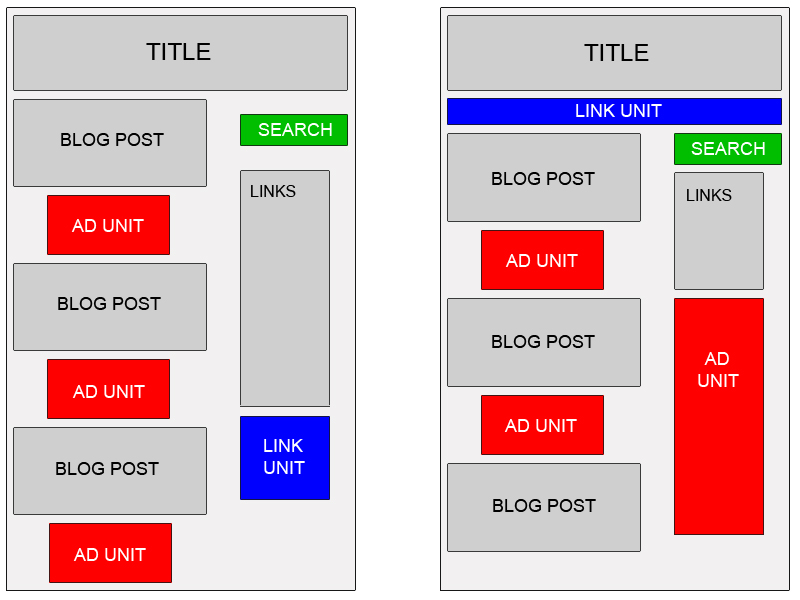
When working with a blog, you're facing some interesting ad implementation challenges: a predetermined page format, highly targeted content, and regular visitors, among other things. To make the most of your readership and content, here are a few suggestions:

Blend ads into your blog

To increase the likelihood that your readers will see and click on your ads, blend your ad units into the background of your blog. Choose a bold color for the ad title to help draw attention to your ads, then make sure that the background and borders of your ads are the same color as the background of the area where the ad is placed.

Map

Experiment with multiple ad formats and locations

In general, wider ad formats tend to be more reader-friendly. Placing an ad unit after the first post will likely catch your readers' attention. Take a look at our sample implementations to get some ideas. Also, consider placing a Skyscraper (120x600) or vertical link unit on the right side of your blog. If you're using Blogger, you can find instructions on placing AdSense code in your blog's sidebar.


Offer readers more options with search and referrals

To make sure you're earning the most revenue possible with AdSense, go beyond just ads to use AdSense for search and referrals. You can increase your earnings, provide readers with valuable information, and take advantage of flexible formats.


Improve ad targeting

With section targeting, you can target an ad unit to a specific section of your blog, as well as block out irrelevant sections like navigational links. We recommend that only those familiar with HTML attempt to implement section targeting.

Tip for generating more traffic to your blog: If you're a Blogger user, activate this setting to notify Weblogs.com, a blog update notification service, whenever you have updated your blog. That means your blog will be included in various "recently updated" lists on the web as well as other blog-related services.


Original source Copyrighted © by Google Adsense Help center

08 November 2007

Get Free Domain Name from FreeDN

Tired of paying to register domain names? Then welcome to FreeDN, your source for free domain name registration. All you have to do is complete simple offers to earn points.


For every 100 points you earn you get a free domain registration at Dotster. That's a $15 value. Many of our offers pay more than 100 points, so earning free domains is simple. To begin, enter your e-mail address and desired password below.

Register for FREE DOMAIN NAME click here!

50 Fresh Tips On Getting More Traffic To Your Website

1. Write and submit articles to the article directories.

2. Leave comments on other people’s blogs with a backlink to your site.

3. Answer people’s questions on www.answers.yahoo.com.

4. Post in forums and have a link to your site in your signature.

5. Write a press release and submit it to www.PRWeb.com.

6. Advertise your website in the appropriate category on www.CraigsList.co

7. Give an unbiased testimonial on a product/service that you have used in exchange for a backlink to your site.

8. Start a blog and submit it to the 100’s of free blog directories.

9. Manually submit your website to the major search engines.

10. Optimize each page of your website for a particular keyword or search phrase.

11. Add a link in your email signature to your website. It’s a free and easy way to get a little more traffic.

12. Make a custom 404 error page for your website redirecting people to your home page.

13. Use PPC search engine advertising.

14. Add a “bookmark this site” link to your webpages.

15. Have a tell-a-friend form on your site.

16. Send articles to ezine publishers that includes a link to your website.

17. Hold a crazy content and make it go viral.

18. Give away a freebie (ebook, report, e-course) to keep people coming back to your site.

19. Add an RSS feed to your blog.

20. Submit your site to any related niche directories on the net.

21. Participate in a banner or link exchange program.

22. Create a software program and give it away for free.

23. Purchase the misspellings or variations of your domain name, or those of your competitors.

24. Buy a domain name related to your niche that is already receiving traffic and forward it to your site.

25. Pass out business cards with your domain on them everywhere you go.

26. Start and affiliate program and let your affiliates send you visitors.

27. Start a page on social bookmarking sites such as www.MySpace.com.

28. Submit a viral video to www.YouTube.com

29. Conduct and publish surveys to your website.

30. Find joint venture partners that will send you traffic.

31. Start your own newsletter or ezine.

32. Use a autoresponder or email campaign to keep people coming back to your site.

33. Purchase ads on other sites.

34. Send a free copy of your product to other site owners in exchange for a product review.

35. Sell or place classified ads on www.eBay.com with a link to your site.

36. Post free classified ads on any of the sites that allow them with a link to your site.

37. Exchange reciprocal links with other related websites.

38. Network with other people at seminars or other live events.

39. Purchase advertising in popular newsletters or ezines.

40. Advertise on other product’s “thank you” pages.

41. Create a free ebook and list in on the “free ebook” sites.

42. Buy and use a memorable domain name.

43. Do something controversial.

44. Create an Amazon profile and submit reviews for books and other products that you have read.

45. Start a lens on www.Squidoo.com.

46. Use a traffic exchange (low quality traffic, but can sometimes be worthwhile).

47. Get referrals form similar but non-competing sites.

48. Create and sell a product with resell or giveaway rights and include a link to your site in it o others pass it around for you.

49. Email your list. If you don’t have one, get one.

50. Buy a pair of sandals; get your website engraved on the bottom and walk on the beach, stomp in the mud or play in the snow.


Article by JustinMichie at JustinMichie.com

This article was specially picked by Andre V. for it's usefulness and practicality.

On 110mb.com Forum

Google Adsense Tips

You should be able to find several indispensable facts about Google Adsense in the following paragraphs. If there's at least one fact you didn't know before, imagine the difference it might make.

Google AdSense

You've probably heard a lot about Google AdSense, but you may not know just what it is. Well, its a one of the hottest new ways to make money online without having to do a whole lot. If you have a website, you should have Google AdSense ads on your site. It's a great way to create a passive income.

Passive Income from Google Adsense

Passive income is income that you get without having to work for it. I know this may sound like some kind of pie in the sky get-rich-quick scheme, but passive income is for real.

In fact, every single billionaire on earth uses the power of passive income to keep money coming in while he or she jets off to parties and resorts and such

The best example of passive income in the physical world is real estate. When you own an apartment building and hire a property manager and a maintenance crew to take care of it for you and collect the rents, all you have to do is cash the checks that roll in.

Google AdSense is sort of like that only on a smaller scale and free to use.

Hopefully the information presented so far has been applicable. You might also want to consider the following:

How do I add Adsense ads to my site?

Once you have a site up and running, all you do is add a little code that you get from Google and you make money each time someone clicks on an ad from your site.

Tip! Choose an Internet domain name with these three characteristics: 1) Easy to remember. 2) Short and to the point. 3) Related to your products or company name.
How much will I earn?

How much will you make? Well that depends on the traffic you receive to your website and the content of your site. Some subjects have higher payouts than others.

Spread it around

This is why it's a good idea to have many different sites on many different subjects. Attract a crowd to each site and you can make a bundle from Google AdSense.

When you visitors are done on your site, they have to go somewhere. The most logical thing for them to do is click on a link to another site. This is the way people surf the net. They go from one site to another via links.

Your links can make you money if the links are Google AdSense ads.

Take time to consider the points presented above about putting Google Adsense ads on your website. What you learn may help you overcome your hesitation to take action.

If you are ready to start your Google Adsense career you can get all the information for signing up by following the link below ...


Original Articles written by Candice Pardue, freelance web content writer and owner of Online Success for Internet Business. Go here to find a web design beginners course.
http://www.webmastercourse.com/articles/adsense/

25 October 2007

Your browsing is valuable

AGLOCO is A Global Community is owned by its member.

AGLOCO Members make money in four ways.
  • Members earn a monthly share of the AGLOCO revenue based on the use of the AGLOCO Viewbar™ that month.
  • Members earn part of the company based on the use of the AGLOCO Viewbar™ that month (currently a maximum of five hours are rewarded). Click here for details.
  • Members who use our referral system to help build the AGLOCO network will earn more. (AGLOCO only has significant value as a large network and people who help build it should be rewarded. – We also feel that the early users who told friends about YouTube or MySpace or even Google probably deserved something too, but no referral system was available to record their work).
  • Members will also get a share of any commissions AGLOCO gets when a Member purchases a product or service from an AGLOCO Sponsor company.


Your browsing is valuable, how valuable you are?
5 easy step to make your money with AGLOCO:
  1. Joint AGLOCO now,
  2. Invite more your friends,
  3. Download the viewbar,
  4. Logging in to your viewbar every you are browsing,
  5. It's now your commpany.

30 September 2007

Your web/Blog is a Money Maker

The following is a list of all the ad networks and affiliate programs, They have proven to provide good service/support and most importantly, on time payments.

Kontera ContentLink

Kontera ContentLink allows you to make money from advertising without giving up any current advertising spots. Normally Kontera requires a site have a minimum 500,000 page views per month before being accepted into the program. However, I have a partnership with Kontera that will allow smaller blogs to use their ContentLink service.

Sign up for Kontera

Google AdSense

This is pretty much a must have if you want to make money from a blog. Google display simple text and image ads on your blog that are targeted to what you’re writing about. Google has been a consistent money maker for this blog.

Sign up for AdSense.


Bidvertiser

Bidvertiser, a CPC ad network that competes with Google AdSense. It main advantage over AdSense is its low $10 payout. You only need to make $10 in order to be paid. Big publishers wouldn’t care about this but for many small blogs that are still waiting to hit that magic $100 Google payout level, getting pay at a lower level is quite attractive.

Sign up for Bidvertiser


AdBrite

AdBrite is the Internet’s ad marketplace. Who offer a high level of service, science, value, targeting and transparency to help each of our advertisers become successful.

Sign up for AdBrite

AuctionAds

AuctionAds is one big eBay affiliate. What AuctionAds does is put all their publishers into one big “collective” to go after the higher revenue share. Publishers can leverage AuctionAds’ creative delivery of eBay’s auctions and AuctionAds’ ability to achieve the higher performance incentive tiers with the aggregate volume of traffic to make more money than they could with their own eBay affiliate relationship. Right now, affiliates will get 100% of any money they make from the system. As the collective moves up the eBay revenue share tiers, AuctionAds will start to take a cut of revenues. The goal is for you to make more with AuctionAds than directly with eBay’s affiliate program, which will be the case as the network increases its volume.

Sign up for AuctionAds


ReviewMe

ReviewMe is this blog’s biggest money maker, accounting for $2,400 of the $8,545.25 March income. ReviewMe allows advertisers to buy sponsored reviews on your blog. Review prices are based on your blog’s Alexa, Technorati and estimated RSS numbers. Publishers can set their own pricing if they don’t like the price ReviewMe set. Reviews can be positive or negative. The only requirement is the post must be at least 200 words long.

Sign up for ReviewMe


AGLOCO

AGLOCO offers a toolbar that display advertising. If you run the toolbar, they will give you a share of the ad money. They also pay you if you refer other people to use the toolbar. The more people you refer, the more you can potentially make. Currently, my network has over 13,000 people in it and it’s increasing by over 100 per day. AGLOCO is a startup and unproven. However, since the cost of entry is zero, you can’t lose anything for signing up. AGLOCO is also the only network here that doesn’t require you to have a site.

Sign up for AGLOCO


AzoogleAds

AzoogleAds is one of the largest performance-based online advertising networks in the world. They offers some of the best and highest paying affiliate deals in the industry. No matter what topic your blog covers, you can find a deal that matches your site. The payout range from $1 to over $100 per action. Affiliate marketing is one of this blog’s biggest moneymaker and AzoogleAds is the affiliate network that offers us the best payouts.

Sign up for AzoogleAds


Content Copy righted

More Details

29 September 2007

How making money from your website/blog

We can earn money from our site/blog using several program, such us Referal program, Publishing advertiment on our pages and other.

There is some of Advertisment program for you;
Originally adopted from 110mb Forum

Adsense - It's from Google, it's ok for some. It works best with sites that get a really good amount of traffic (1000+ wk). You earn everytime someone clicks an ad, so in theory you could show a million ads and if no one clicks on it - you get zilch. But that's very unlikely, but still a lot of people block google ads and those that haven't are gradually learning to ignore the ads. Google has a minimum payout of $100 - meaning you have to earn $100 before they'll send you money. Google's also very vigilante on click fraud - so don't think you can click your own ads, because there are cases where people did so and were banned. Also there are some legitimate cases of Google wrongfully closing accounts - which is why it's not exactly the best system to go with. You can use their banner ads, and some toolbars but that's about it, no real variety in the ways you can advertise - it's basically just text-based banner ads. (cheque)

Adbrite - Personally I think that sites without a lot of traffic (less then 1000 wk) should go with Adbrite. It works by how many ads people see as opposed to how many they click. You can make a lot of money if you attract advertisers to put ads on your site, otherwise you'll make an ok amount with regular networked ads. The best part is that you can make money in other ways like through your images or putting videos on your site. So you can monetize your youtube embedded videos, or pictures in a gallery or whatever. They allow all content and pay whenever you want them to, no minimum payout limit. (cheque)

Clicksor - No real experience with this, but it's again similar to Adbrite but less advertisers and publishers using it. From what I hear they're not very good, but it's an alternative should you seek one (cheque / paypal?)

Amazon - Sell items via Amazon's online store, basically you get a commission off of items sold. It's a little harder to convert traffic into sales, so it won't pay off well for most. (Cheque)

PayPopUp - The worst option by far, is paypopups. You can insert some code which will launch a popup window on load, or exit or a popunder and you get paid for it. The earnings are actually quite good, but everyone hates popups, so you better either have a good amount of new traffic - or have very very very loyal visitors who will put up with the popups.


Copy Righted
More details

Getting more visit to my website

Visitor is our consumer for our website, for reading our contents, downloading files and more. . .
Then How to getting more visitor to our website?

We have several solutions to getting more traffic to our site; there is some of tips taken from 110mb Forum :

1) via search engines (80% will come from google)
2) viral marketing
3) directory submission
4) writing articles and submitting to article directories
5) submitting fresh unique content articles to social bookmarking sites.
--

1) via search engines (80% will come from google)

Since this is a very long discussion, I'll summarize this in a nutshell...

Search engines like 2 things only (despite what everyone says).

a) Unique content (which is not found anywhere else on the web.) So content from your own brain, or heavily changed already-existing content.

b) Regularly updating content. It's one thing to create a site and never touch it for months. But another to constantly ADD new content in it.

And (b) is example why blogs in todays online world are so popular. Blogs get traffic like crazy because Search Engines totally love them for their daily updating nature.


In a nutshell: The best thing you can do to instantly establish your website's reputation in big 3 SE's (Google, Yahoo & MSN) is to start a blog of your own. 1-click app installer has a script called "CuteNews.Ru" in it.

I totally recommend that blog script over Wordpress. Because CuteNews does not use a MySQL database plus has search engine friendly links WITHOUT the need of htaccess support. So it's the best script out there in my opinion.

When you set it up, you want to:

1) Post regularly at least 3 new articles in your blog on the subject you made your site to be about.

I know writing your own articles is a pain, so start by taking articles from other sources. But only do if they allow permission. And make sure you give credit to the original source. Else you'll get into copyright infringement trouble.

2) Focus on a 3 or 4 keyword phrase that you're gonna use extra all over your blog or even the entire site (outside the blog too).

This keyword phrase is how your site will be found via SE's. So when someone types it into Google and presses Enter, your site will pop up on first page. Don't worry how. Just know: Choose a non-competitive 3/4 keyword phrase and stick to getting it all over your site. But without making it look like you're keyword spamming.


--
2) viral marketing

Basis of this involves writing a short VERY USEFUL report on the topic you're into (your hobby). This report should contain information that HELPS others who are into your same subject. So if you're into training dogs, then write a short report that reveals a shortcut method to teaching how dog owners can teach their dogs to sit everytime they say "sit".

But what you wanna do is all over your free report (on every page), say something like:

"For more free and very useful information on dog training, visit: www.site.com"


You can imagine this working really good. Giving a very useful free report and encouraging everyone to pass it along to others. But you don't care, because majority will visit your site though the links in the report.

The way you get your eBook/report (must be in PDF format. You can find a free PDF maker online.) out there to same type of people you want to target is you find a forum that already has an established reputation.

You participate in the forum, and say something like "hey, I though I share with you my report on how to ____. It's really good and covers information I haven't seen anyone talk here about.".


--
3) directory submission

As soon as you create your site,

a) submit it to www.addme.com (but tick off Google, Yahoo and MSN. Let the big 3 find your site themselves. I'll tell how.)
b) Submit to dmoz.org

c) Search online for "directory list" and find a list of directories that allow you to submit to them, becuase that's how Google/Yahoo/MSN will pick up your site themselves (which is always smarter then submitting to them manually).

A typical free directory is: http://directory.110mb.com

Submit to http://110search.com also.


--
4) writing articles and submitting to article directories

If you're an expert in your field, you can write short useful "tip" type of articles. And then immediately submit them to article directories. Most popular are: www.ezinearticles.com AND www.articlecity.com

Then others will take your article (which already should contain your website link telling them that more info can be found at your site www.site.com) and put it on their site. So their visitors will read it, and click to your site. BANG. Tons of free visitors.

See existing articles to see how they're structured and written.

They basically have the article and the signature. The signature is where you can advertise your site.


5) submitting fresh unique content articles to social bookmarking sites.

Going back to #1, as soon as you write up your article, submit to:

www.stumbleupon.com
www.digg.com
www.netscape.com
del.icio.us
furl.net

But ALWAYS wait at least 30 minutes before submitting the next article. Else you'll be marked as spammer and never again will you get a second chance.

I use this #5 method on my blogs. And those sites above alone bring in over 3000 unique visitors per day.

Ofcourse this will 95% depend on how good the headline is and the short description.

And never submit more then 3 articles per day to above sites. To be on safe side, submit 3 article every 3 days.


========================
COPYRIGHT NOTICE:
This article is copyright of 110mb.com. And you may only use 30% of this articles
content on your site. And tell your visitors that other 70% can be found at:

http://www.110mb.com/forum/how-to-get-more-visite-to-my-website-t19150.0.html
========================

27 September 2007

Best 10 wordpress plugin for Google AdSense

Google Adsense has become the most popular online contextual advertising program.
Mix Adsense with your content is essential to gain more customer for your adsense. There is best plugin to mix it with your wordpress blog,


  • Adsense Deluxe - offers advanced options for managing the automatic insertion of Google AdSense or Yahoo Publisher Network (YPN) ads to your WordPress posts. Adsense Deluxe+ claims to have a an improved ad limiting algorithm.

  • Adsense Injection - inserts Adsense code randomly into a pre-existing blog.

  • Adsense Inline - inserts Google adsense in blog posts

  • Adsense Beautifier - makes your Adsense look beautiful by placing images beside them to increase your clicks (CTR) and subsequent Adsense earnings.

  • AdSense Widget for WordPress Sidebar - Google AdSense widget designed for the new WordPress Sidebar Widgets plug-in.

  • MightyAdsense - allows you to host the code in wordpress without having to modify the templates. Ads are displayed in post item and you can specify how many blocks its going to show up in a page.

  • AdRotator Wordpress Plugin - rotates your adsense ads with other affiliate programs like Chitika Eminimalls wherever you want. Helps to reduce ad blindness and test different ad formats and affiliate programs.

  • Adsense Earnings Wordpress Plugin - displays your adsense earning details within wordpress admin panel.

  • WP-AdsenseProfit - shows your profit from the adsense program to the public by adding a simple call to the function in your template.

  • AdSense Sharing Revenue and Earnings System - allows you to view your adsense earnings and share your adsense impressions with your friends and co-authors.

  • Author Adsense Wordpress Plugin - allows blog authors to enter their Google Adsense Publisher ID and have ads displayed on their own posts generating revenue. Admin can set the ratio of author’s ads to admin ads.

More Details

AdSense-Deluxe WordPress Plugin

AdSense-Deluxe is an easy-to-use plugin for WordPress 1.5+ (including WP 2.0) for quickly inserting Google or Yahoo! ads into your blog posts, and managing when and where those ads are displayed. It was developed for my own use after an exhaustive search for a similar tool turned up nothing adequate.

Have you added Google AdSense to your WordPress blog yet? Or maybe thought about it? I was thinking about this last year and knew I could do it generically in the templates, or painfully by pasting the AdSense code into each post I wanted it in, but neither seemed like the optimal way to accomplish my aims. I wanted some flexibility in deciding which posts ads appear in and perhaps some control of which ad format would display in any given blog post.

Usage:

You can wrap inline CSS styles around your AdSense blocks, or place any other html or strings around, before or after the AdSense JavaScript. For example:

< style="display:block;float:left;padding:5px;">

your google adsense code


To insert any of your defined ad units within template files, you can call a PHP plugin function with the name of the ad unit you want displayed. The syntax is as follows:

< ? php adsense_deluxe_ads('my_AdBlock_name');? >

However, it’s strongly recommended that you always confirm that the function is available to keep from generating PHP errors or breaking your page display, using the following syntax:

< ? php if(function_exists('ad_unit_name')) :
adsense_deluxe_ads('my_ad_unit'); endif;? >

When you use this new feature it enables the plugin to track the total number of AdSense units displayed on a page and avoid inserting more than the maximum of three units allowed by Google.
More details

16 September 2007

Info milis beasiswa

Assalamu'alaikum..

numpang tulisan yaaa....

Rekan-Rekan,

Website http://www.milisbeasiswa.com memberikan informasi beasiswa
lengkap dengan tipsnya. Website ini dikembangkan dari milis yang dikelola
para moderator yang berpengalaman memenangkan berbagai beasiswa.


Berbagai hal lain yang bisa kamu temukan di website ini:
- Berdiskusi dengan pemburu beasiswa lain di forum diskusi beasiswa.
- Berlangganan informasi beasiswa lewat email secara gratis.
- Membeli buku "Kiat Memenangkan Beasiswa" langsung dari penulisnya.

Baca selengkapnya di http://www.milisbeasiswa.com .

Salam,
istiyanto


original posted by istiyanto to my mail, Jazzakallah

Histats.com free web stats and stats counter

For english version visit histats.com

Counter atopun web stats sudah ngga asing lagi buat kita para webmaster atopun blogger. Dengan adanya counter, kita maupun visitor bisa tau berapa banyak visitor yang telah mengunjungi situs web/blog kita. Sedang web stats sangat berguna banget buat kita webmaster/blogger, karena kita bisa mengetahui informasi dari visitor mulai dari browser yang dipakai untuk membuka halaman web/blog kita, OS yang dipakai hingga informasi geolokasi negara bahkan kota tempat mengakses situs web/blog kita.

Yach, mungkin karna fungsinya yang mak nyuss... tersebut Counter dan web stats menjadi salah satu modul yang wajib ada di halaman web/blog kita.
Permasalahannya adalah ngga' semua kita bisa coding -Paling ngga' pake PHP lah- untuk buat counter atopun web stats itu khan.., He he he termasuk ane coy, ngga' bisa coding. Tapi jangan understimit -mencuplik kata-kata mas Tukul- dulu, kata pepatah banyak jalan ke neraka, eh banyak jalan ke roma gitcu maksudnya... Salah satunya kita bisa pake layanan FREE Counter dari Histats dot com, mungkin ini situs terbaik yang pernah aku coba untuk layanan counter dan web statistiknya yang komplit abizzz dibanding situs lain -barang kaliiii aje-.
Situs ini punya berbagai fitur untuk layanan free hit counter-nya; -ini aku terjemain langsung dari homepagenya-
-Real time statistik dan info pengguna yang sedang online.
-Statistik untuk tiap halaman atau sesi dari web/blog kita.
-Detil info pengunjung (language, OS, screen size..)
-Detil statistik untuk 1000 pengunjung terakhir, komplit page urls, IP, everything!
-layanan counter klik, untuk mengetahui berapa kali file telah didonlot.
-Histats.com counter juga bisa dipake untuk myspace! hi5, friendster dan berbagai blog environment.

Selamat mencoba!!!

Mengamati report Web/Blog dengan Google Webmaster Tools

Google Webmaster Tools (GWT) merupakan salah satu service gratis google yang memberikan berbagai keuntungan buat situs kita, terutama tool Google Sitemaps dimana dengan tools tersebut kita dapat melihat report apakah website atau blog (Web/blog) kita telah tercantum dalam Search Engine Result Pages (SERP), tercantum dengan keyword apa dan kita juga dapat melihat statistik dari mana saja asal pengunjung web/blog dan link yang mengarah ke web/blog kita.

Kita bisa mendapatkan service GWT ini secara gratis yang perlu dilakukan hanyalah:

# Pertama yang kudu dilakuin, daftar dulu di sitenya GWT, atau klo udah punya akun di google (ex. Gmail) bisa pula dipake buat login.

# Login ke akun GWT kamu, trus masuk ke menu Webmaster Tools (Including Sitemaps).

# Untuk menambahkan alamat web/blog, klik Add Site kemudian masukkan alamat situs kita (lengkap pake http://www.) terus klik

# Pada halaman berikutnya, klik Next Step >> Verify Your SIte.

# Verifikasi alamat site kamu tadi, bisa dilakukan dengan dua pilihan cara verifikasi, yaitu:

+ Dengan menambahkan informasi meta-tag yang diberikan ke header halaman web/blog kita.

+ Ato cara kedua dengan meng-upload file kosong (dengan nama sesuai yang diberikan GWT saat akan melakukan verifikasi) ke server web/blog kita.

Terserah kamu cara verifikasi mana yang kamu pilih, apapun itu yang penting sebelum melakukan verifikasi yang perlu dilakuin, jika:

Verifikasi dengan cara pertama, tambahkan dulu meta-tag ke header halaman utama web/blog kamu (biasanya index.html ato tergantung aplikasi web/blog yang kamu pake). Caranya:
Tambahkan informasi meta-tag yang diberikan, diantara tag header halaman web/blog kamu.

<>
<>

Untuk verifikasi cara kedua buat dulu file HTML baru dengan nama seperti yang diberikan GWT.
ex:

# Back to laptop, eh.. GWT dashboard, trus klik tombol verifikasi, tunggu beberapa detik hingga status pada alamt site kamu tercentang (verify sukses).

Sampe disini dulu, untuk penggunaan tools lain pada GWT Insya4jj1 akan dibahas pada halaman lain.

Membasmi virus pakai TuneUp Utilities

Lagi-lagi virus, emang ga' ada pa kerjaan lain buat para VM selain ngebikin susah dan penasaran orang :?:
Ooops tapi ga' apa-apa ga' ada virus ya ga' belajar..., Kali ini mau dibahas cara semi manual <>. Koq manual? ya soalnya emang ga' pakai AV atau program pembasmi virus yang tinggal Klik "Next, next, next, finish". Lha kan pake TuneUp? ah ente gimana TuneUp kan cuma sebagai sarana penolong aja.

Ga' usah banyak basa-banci hmmm basa-basi dah :!: Oke, langsung aja siapin peralatan tempurnya yaaa:

1. Kompie alias komputer, klo ga' punya pakai punya pacar atau teman ga' apalah.
2. TuneUp Utilities sebagai penolong untuk mempermudah kita "menembak" tuh virus, klo blom install bisa disewa dari persewaan cd terdekat. Hardly Recomended: Install dulu!!! sebelumerinfeksi virus.
3. Virusnya buat uji nyali, klo kebetulan dah terinfeksi ya Its oke lah, klo blom punya bisa minta ke warnet terdekat.
4. Secangkir kofimix plush cemilan yaaang banyak.

Akhir-akhir ini emang virus lokal berkembang bak jamur dikulit ente 8) varian dan jenis virus barupun makin banyak. Tapi virus lokal punya cara yang unik dan khas untuk memuluskan serangan mereka. Biasanya mendisable Run, Regedit, Folder Option ama Search dan yang paling parah disable windows logon. Ga' cuman itu beberapa malah mendelete program AV, menghentikan akses ke Hijak tools dan system explorer yang biasanya dipakai buat bantuin membersihkan virus secara manual, nah mampus lo trus klo dah ga' bisa apa-apa begini, lha mau ngapain dab? Santai aja bro jawabnya, lha kita kan dah install TuneUp tho. Yach cape dech, TuneUp blom install malah virusnya dah nyebar :? Makanya kan aku sarankan untuk menginstall TuneUp-nya dulu kata pepatah "Sedia payung sebelum hujan"-lah.

Langsung aja, tapi ingat tidak selamanya cara ini bisa terutama saat virus udah mengganas dan komputer jadi lambat dan Tuneup blom terinstall lagi . :?

1. Saat seketika terjadi serangan virus , yah gimana ngertinya dab? Dirasakan ajah, biasanya begitu virus aktif akan ada perubahan di lingkungan explorer, check aja apakah Tools->Folder option-nya masih ada, coba jalanin search atau regedit bisa ga', atau coba colokin FlashDisk copy sembarang file, trus liat isi FlashDisknya ada file tertentu yang juga ikut ter-copy ga'. Klo ada tanda-tanda diatas yang benar, Segera hubungi dokter hewan terdekat?, ya ga' lah P3K-nya jangan diklose tuh explorer apalagi keluar windows.


2. Langsung Install TuneUp! klo udah ada langsung jalanin, trus masuk ke menu Administer control -> TuneUp Registry Editor.


Administer control menu.

TuneUp Registry Editor.

3. Trus lakuin aja yang musti dilakuin untuk menghentikan serangan virus, manual virusnya bisa diliat di vaksin dot com atau search aja pakai Paman Google.

Oalah jadi intinya itu ternyata cuma supaya kita bisa ngakses ke Registry-nya ya dab!? bushet dah, tiwas tak baca ni artikel yang super njlimet, n bikin mumet
:twisted:
Tunggu dulu bro, masih ada kok
4. Masuk ke folder
HKEY_CURRENT_USER\Software\Microsoft\Windows\CurrentVersion\Policies cari register DisableRegedit jika ada, atau mungkin register lain yang mencurigakan ubah string value-nya jadi (0) atau langsung aja didelete, ini buat ngebalikin fungsi regedit.

5. Untuk mengembalikan fungsi yang didisable (Run, Regedit, Folder Option ama Search), masuk ke folder
HKEY_CURRENT_USER\Software\Microsoft\Windows\CurrentVersion\Policies\Explorer, trus ubah string valuenya jadi (0) atau langsung didelete register yang mencurigakan misal NoRun Reg_dword 0x00000000 (1) di ubah jadi NoRun Reg_dword 0x00000000 (0). Maksudnya 1 -> true berarti NoRun aktif, dan sebaliknya.

6. Asumsi fungsi Search dah jalan, langsung search *.exe dengan ukuran tertentu tergantung variant, dengan icon gambar folder atau icon file word, pdf atau lainnya.
Cari dulu di C:/Windows biasanya inti virusnya disini. Langsung delete semua file virusnya klo akses delete didisable pakai aja Tune Up Shreder.

7. Met mencoba dan bereksperiment,
Biarkan virus menyerang, kan ku basmi sebisa otak-ku.


Thanks to:
Allah azza wa jalla,
TuneUp,
Virus dan VM-nya,
artikel " Cara Mudah Melawan Semua Virus Local Tanpa Antivirus" di Jasakom dot com

Mengenali ciri fisik virus komputer

Begitu dengar kata "virus" langsung dech inget sama "Flu burung, sars, HIV-AIDS" dll-nya yang pernah tenar beberapa waktu lalu, eitz.... tunggu dulu bro!!! yang mau kita bahas disini adalah virus komputer bukannya virus-virus secara biologis itu apalagi virus-virus cinta :-)


Virus komputer? pasti dech sudah ga asing lagi buat kita para PK alias user (pengguna komputer), seperti Brontok, shery, decoil, kspoold yang pernah nyarang di kompie-ku.

Ciip boz, bicara soal virus komputer mustinya kita kudu ngerti dulu kali apa tuh virus komputer?

Virus komputer:


Trus kita musti tau juga khan ciri-ciri program/aplikasi tu dikatakan sebagai virus, lha emang ini ni yang mau dibahas di halaman ini bro,


Secara fisik alias kasat mata [selama ente masih bisa ngakses explorer ente] ada beberapa ciri untuk mencurigai suatu program/aplikasi sebagai virus;


-Yang jelas ekstensinya .exe bisa pula .bat


-Biasanya ukuran filenya <>Folder Option->View->Uncheck "hide extensions..." pada explorer ente.


-Jalankan AV, dan jangan males-males untuk selalu meng-update virus definition terbarunya.


-Biar lebih aman, ga kena virus dari luar, tutup port USB ente, cabut kabel LAN, matikan power, masukkan kompie ente ke kardus trus diidolasi, cip duahhh... ealah emang mau digadaikan po py?!..


Selamat mencobai...

free ebook Computer, Internet, Hacking ebook

This articles will show to you some direct links to download Computer, Internet and Hacking eBook. Such us:
  • Hacking for Dummies
  • Google Hacking for Penetration Tester
  • Hacking Windows XP
  • and more, more...


Use Mozilla FIrefox and FlashGot add-on from FlashGot to accelerate your download.
    Free download # Computer, Internet, Hacking ebook
  • Google Hacks : "Hacks" are generally considered to be "quick-n-dirty" solutions to programming problems or interesting techniques for getting a task done. But what does this kind of hacking have to do with Google?
    The idea of Google Hacks is not to give you some exhaustive manual of how every command in the Google syntax works, but rather to show you some tricks for making the best use of a search and show applications of the Google API that perform searches that you can't perform using the regular Google interface. In other words, hacks.

  • Google Hacking for Penetration Testers : Google’s Web interface is unmistakable. Its “look and feel” is copyright-protected, and for good reason. It is clean and simple. What most people fail to realize is that the interface is also extremely powerful.Throughout this book, we will see how you can use Google to uncover truly amazing things. However, as in most things in life, before you can run, you must learn to walk.


  • Hacking for Dummies by Kevin Beaver : This book outlines computer hacker tricks and techniques — in plain English — to assess the security of your own information systems, find security vulnerabilities, and fix the vulnerabilities before malicious and criminal hackers have an opportunity to take advantage of them.

  • Web Hacking: Attacks and Defense : "Both novice and seasoned readers will come away with an increased understanding of how Web hacking occurs and enhanced skill at developing defenses against such Web attacks. Technologies covered include Web languages and protocols, Web and database servers, payment systems and shopping carts, and critical vulnerabilities associated with URLs. This book is a virtual battle plan that will help you identify and eliminate threats that could take your Web site off line..."-From the Foreword by William C. Boni, Chief Information Security Officer, Motorola

  • Internet Security-chrypthograph principles and protocol : by Man Young Rhee, The material in this book presents the theory and practice on Internet security and its implementation through a rigorous, thorough and qualitative presentation in depth. The level of the book is designed to be suitable for senior and graduate students, professional engineers and researchers as an introduction to Internet security principles.


  • Hacking into Computer System : So you want to be a harmless hacker?, Hacking Windows 95!, Hacking into Windows 95 (and a little bit of NT lore)!, Hacking from Windows 3.x, 95 and NT, How to Get a *Good* Shell Account, Part 1, How to Get a *Good* Shell Account, Part 2, How to use the Web to look up information on hacking., Computer hacking. Where did it begin and how did it grow?

  • HACKING SECRETS REVEALED : This book show to you how hackers gain
    access to your system using security flaws and programs. The
    theory goes that if you are aware of what they are doing and how
    they are doing it you’ll be in a much better position to protect
    yourself from these attacks.

  • Art Of Deception by Kevin Mitnick : This book contains a wealth of information about information security and social engineering.
    Social Engineering uses influence and persuasion to deceive people by convincing them that the social engineer is someone he is not,or by manipulation. As a result, the social engineer is able to take advantage of people to obtain information with or without the use of technology.


  • Hacking Windows XP by Steve Sinchak
    : Windows XP is a great operating system. It is faster and more secure than any other version of Windows. However, for some, it is not fast and secure enough. By picking up this book, you have started a three-part journey that will guide you through all of the steps of customizing, optimizing for performance, and securing Windows XP.

  • 802.11® Wireless Networks The Definitive Guide By Matthew Gast : The de facto standard for wireless networking is the 802.11 protocol, which includes Wi-Fi (the wireless standard known as 802.11b) and its faster cousin, 802.11g. And 802.11 Wireless Networks: The Definitive Guide, 2nd Edition is the perfect place to start.

  • IRC Hacks By Paul Mutton : IRC Hacks is a collection of tips and tools that cover just about everything needed to become a true IRC master, featuring contributions from some of the most renowned IRC hackers, many of whom collaborated on IRC, grouping together to form the channel #irchacks on the freenode IRC network (irc.freenode.net).

  • HTTP: The Definitive Guide : Web technology has become the foundation for all sorts of critical networked applications and far-reaching methods of data exchange, and beneath it all is a fundamental protocol: HyperText Transfer Protocol, or HTTP. HTTP: The Definitive Guide documents everything that technical people need for using HTTP efficiently.

  • PDF Hacks By Sid Steward : PDF Hacks is ideal for anyone who works with PDF on a regular basis. Hacks cover the full range of PDF functionality, including generating, manipulating, annotating, and consuming PDF information.


Thankz to

My God : 4jj1 azza wa jalla

Googlepages, and Google Team for your free storage.

All people, who ’ve ripped this eBooks for free to use.

and You all, who ’ve visited my web/blog.

Free Webdesign, HTML, CSS, JavaScript ebook

List of free download software, ebook, and tutorial links. This is the next version of it, i ’ve upload HTML, CSS ebooks to my googlepages, and this is the updated version of my last article.


All file stored at my free googlepages account, so you can accelerate your download to optimize your download and save your minutes.

Use Mozilla FIrefox and FlashGot add-on from FlashGot to accelerate your download.
    Free eBook # Web Design: HTML, CSS, JavaScript
  • 250 HTML and Web Design Screets : looks into the detailed work required to create successfulWeb sites and provides extremely up-to-date approaches to dealing with an array of challenges that the creation ofWeb sites presents. Technologies and topics covered include tools, project management, information architecture, usability, content development and management, HTML, XHTML, and CSS, graphics and multimedia for the Web, accessibility, best uses of dynamic content and rich media, keeping content fresh, improving site ranking and promotions, and managing redesigns.
  • HTML 4 for Dummies : This book tells you how to use HTML 4 to get your page up and running on the World Wide Web.


  • Creating Cool Website with HTML and CSS : This book teach you how to create a coll website using HTML and CSS.
  • Hacks and Filters-Making CSS Work : The theory of Cascading Style Sheets (CSS) is a means to an end: better,

    more efficient Web site design. In the real world, however, CSS does not provide a perfect. To achieve the promise of CSS, working designers have employed a series of workarounds known collectively as hacks. At the most basic level, a CSS hack is a modification to the standard CSS code.
  • HTML and XHTML-The Definitive Guide : This book cover every element of HTML/XHTML in detail, explaining how each element works and how it interacts with other elements. With hundreds of examples, the book gives you models for writing your own effective web pages and for mastering advanced features like style sheets and frames.
  • Web design in a Nutshell : This book focuses on the front-end aspects of Web design—HTML authoring, graphics production, and media development. The content in this book is appropriate for all levels of expertise—from professionals who need to look up a particular detail, to beginners who may require full explanations of new concepts and individual tags.


Thankz to

My God : 4jj1 azza wa jalla

Googlepages, and Google Team for your free storage.

All people, who ’ve ripped this eBooks for free to use.

and You all, who ’ve visited my web/blog.

well, come well, done

Assalamu’alaikum

Hey friends, Well,come to my weblog.
ini adalah blog pertamaku setelah sekian lama melalang di dunia maya.

Ga tau juga padahal dah kenal yang namanya mrs. Website sejak SMA dulu, but baru nafsu bikin blognya akhir-akhir ini, soalnya cuz lagi sibuk ngebuat web sendiri, emang sich udah jadi webnya tapi masalahnya database ane di disabled ama hosting providernya, biasalah yang namanya service gratisan ya… mo gimana lagi ;-(

Tapi its no magazine [ga masalah] sekarang lagi masa pencarian server gratis yang baru, ehhhh ketemunya wordpress… gpp lah buat ngisi masa reses, daripada jari-jemari ini udah gatal buat nulis lagi.

Happy browsing!!!